Check your device's system hardware and software information, test tools, and benchmarks

| Name | Device Info |
|---|---|
| Publisher | Yasiru Nayanajith |
| Genre | Tools |
| Size | 7.49 MB |
| Version | 3.4.1.6 |
| Update | April 5, 2026 |
| Premium Unlocked | |
| Get it On | Play Store |
Screenshots




Device Info is a comprehensive mobile app designed to give users a detailed understanding of their device’s hardware and software. It displays important information such as device model, manufacturer, Android operating system details, CPU and GPU specifications, memory, battery status, and network information. The app offers real-time monitoring of system performance, sensor data, and installed applications. With a user-friendly interface, Device Info helps users understand the capabilities and health of their device, which is useful for everyday users and developers looking for detailed technical information. It also includes features such as hardware tests and customizable widgets to monitor device health.
FEATURES
Comprehensive System and Hardware Overview
One of the key features of Device Info is its ability to provide a complete overview of the device’s hardware and system specifications. Users can easily get detailed information about their phone’s model, manufacturer, IMEI, hardware serial number, and system architecture. This includes the exact operating system version, API level, security patch status, bootloader information, kernel version, and even the user interface version such as One UI. This level of detail is essential for users who want to check system information, troubleshoot, develop, or better understand their device.
Real-time CPU, GPU, and battery monitoring
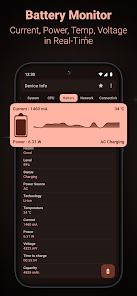
Device Info provides real-time monitoring and detailed metrics related to the device’s CPU, GPU, and battery. For the CPU, users get information such as the system-on-chip (SoC) type, architecture, number of cores, controller status, and clock speed, which are important for performance evaluation. GPU details include manufacturer information and current operating parameters. The battery monitor displays health, voltage, temperature, charge status, capacity, and current power consumption. This continuous monitoring helps users optimize performance and effectively manage battery life.
Extensive Sensor and Connectivity Information
This application is ideal for displaying detailed sensor data, listing each sensor on the device, including power consumption, type, vendor, and maximum range. This is essential for developers, testers, and users to understand the sensing capabilities of the hardware. In addition, it includes comprehensive network and connectivity information, including Wi-Fi strength, standard, IP address, gateway information, Bluetooth, NFC, USB connectivity, and, if available, ultra-wideband capabilities. Such detailed network information is essential for analyzing connectivity issues and ensuring device network interoperability.
Advanced Application Analysis and Management
Device Information provides a detailed list of all installed applications, including the version of various application components, minimum and target operating system requirements, permissions, activities, and services, and offers detailed application analysis. This allows users to check permissions and security for their apps, identify outdated applications, and manage storage more intelligently. Detailed graphical visualizations group apps by SDK version or origin, providing additional insight into the app ecosystem on the device.
Diagnostic tools and customization options
In addition to the data display, Device Info includes a number of diagnostics and benchmarks that check the proper functioning of key hardware components, including the camera, display, touchscreen, sensors, microphone, and speakers. Users can run a screen test, flashlight test, and fingerprint scanner functions. In addition, the app supports customizable widgets for quick access to important device data from the home screen, and allows you to export detailed reports in text or PDF format. These tools are essential for proactive device maintenance and a personalized user experience.
Related posts:


Report

